MURO - Keynote Presentation Template Big Bonus
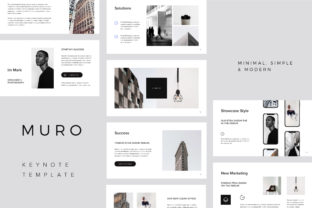
MURO is a powerful and versatile presentation template designed for professionals who value clean design, efficiency, and creativity. Whether you're preparing a business pitch, showcasing a portfolio, or creating an educational material, MURO offers a modern and adaptable solution that fits seamlessly into your workflow. This template comes with a range of features that make it ideal for both seasoned presenters and newcomers to the world of visual communication.
What Makes MURO Stand Out?
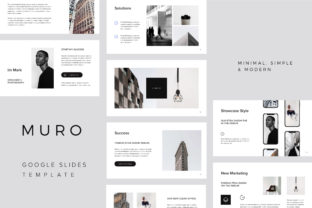
MURO isn't just another presentation template—it's a comprehensive toolkit built with usability and flexibility in mind. The template includes 115 unique slides, all designed in a 16×9 format (1920x1080px), ensuring compatibility with most screens and projectors. With its minimalist aesthetic and focus on clarity, MURO allows users to convey complex ideas without overwhelming the audience.
One of the standout features of MURO is its use of vector graphics. Every element—icons, maps, devices, and shapes—is fully editable and scalable without loss of quality. This makes it easy to customize the template to match your brand or project requirements. Additionally, the template supports one-click resizing and color changes, which significantly speeds up the design process.
The Big Bonus: Stock Photos and Mockups
Alongside the core template, MURO includes a valuable bonus package. Users receive 10 high-resolution stock photos, each at least 4800x3200px, perfect for creating visually engaging presentations. These images are ready to be placed into placeholders, making it simple to add context and depth to your slides.
In addition to the stock photos, MURO also provides four high-resolution Photoshop mockups (3000x2000px). These can be used to showcase your work in a professional setting, such as a product launch or marketing campaign. While Photoshop is required to edit the mockups, they offer a great way to visualize how your content will appear in real-world applications.
Where Does MURO Fit Into Your Workflow?
MURO can be integrated into various stages of a project or creative process. Before starting a presentation, it serves as a foundation for organizing your thoughts and structuring your content. During the creation phase, its flexible layout and editable elements allow for quick adjustments and refinements. After the presentation, the template can be repurposed for other uses, such as a portfolio or digital magazine.
For professionals in fields like marketing, education, and design, MURO acts as a bridge between planning and execution. It helps streamline the process of turning ideas into polished visuals, reducing the time spent on formatting and layout. Its adaptability ensures that it remains useful throughout the lifecycle of a project, whether you're working on a short-term task or a long-term initiative.
How MURO Integrates With Other Tools
MURO is designed to work well with other tools commonly used in creative workflows. For instance, the included stock photos can be paired with graphic design software like Adobe Illustrator or Canva for further customization. The Photoshop mockups provide an opportunity to collaborate with designers or clients, allowing for more detailed feedback and revisions.
Additionally, the vector-based nature of MURO means it can be easily shared across platforms. Whether you're presenting to a team in a meeting or sharing your work online, the template maintains its quality and integrity. This cross-platform compatibility is especially valuable for remote teams or freelancers who need to maintain consistency across different environments.
Practical Tips for Using MURO Effectively
To get the most out of MURO, start by understanding the structure of the template. Each slide is designed with purpose, so take time to explore how they can be used in different contexts. For example, the map slides are ideal for location-based presentations, while the device slides are perfect for tech-related topics.
When using the stock photos, consider how they align with your message. High-quality visuals can enhance the impact of your content, but they should complement rather than distract from your main points. Experiment with different placements and combinations to find what works best for your audience.
Don’t forget to leverage the color customization feature. By adjusting colors to match your brand or personal style, you can create a more cohesive and professional look. This small detail can make a big difference in how your presentation is perceived.
Workflow Examples
- Before the Project: Use MURO to outline your presentation structure and gather visual assets. The template’s placeholders make it easy to organize your content and prepare for the final design phase.
- During the Project: As you develop your slides, take advantage of the editable elements to refine your message. The vector graphics ensure that your design remains sharp and consistent throughout the process.
- After the Project: Repurpose the template for future use. Whether you’re updating your portfolio or creating a new presentation, MURO’s versatility ensures it remains a valuable resource.
By integrating MURO into your workflow, you can save time, reduce stress, and improve the overall quality of your presentations. Its combination of functionality, aesthetics, and flexibility makes it an excellent choice for anyone looking to elevate their visual communication skills.